Explore DMG’s Extreme Urban Mapping webinar highlights: three laser offset workflows for utility and construction crews mapping hard-to-reach assets.
A building corner, an exposed pipe in a trench, or conduit inside a warehouse can interrupt an otherwise straightforward field data collection workflow. Your crew needs the asset’s position, but occupying it with a GNSS receiver may be impractical, unsafe, or ineffective.
Digital Mapping Group’s September 23, 2026 webinar, Extreme Urban Mapping, demonstrated three ways to extend GNSS positioning with laser measurements. Using Eos Positioning Systems’ Skadi Series™ GNSS receivers and complementary measurement tools, including laser range finders from Lasertech, Inc. the session focused on matching the collection method to the field conditions while keeping the resulting data usable in GIS.
Extend GNSS from a reliable position
Laser/lidar remote measurements let you capture a visible asset from a location where your GNSS receiver can obtain a reliable position. Rather than moving the receiver onto the asset, you combine its position with laser/lidar measurements to the target.
The webinar grouped these workflows into three tiers: nearby targets, longer line-of-sight measurements, and locations requiring a traverse into a GNSS-denied space. Each tier adds reach or flexibility, along with its own setup and measurement considerations.
Tier 1: Nearby assets with the Skadi Smart Handle
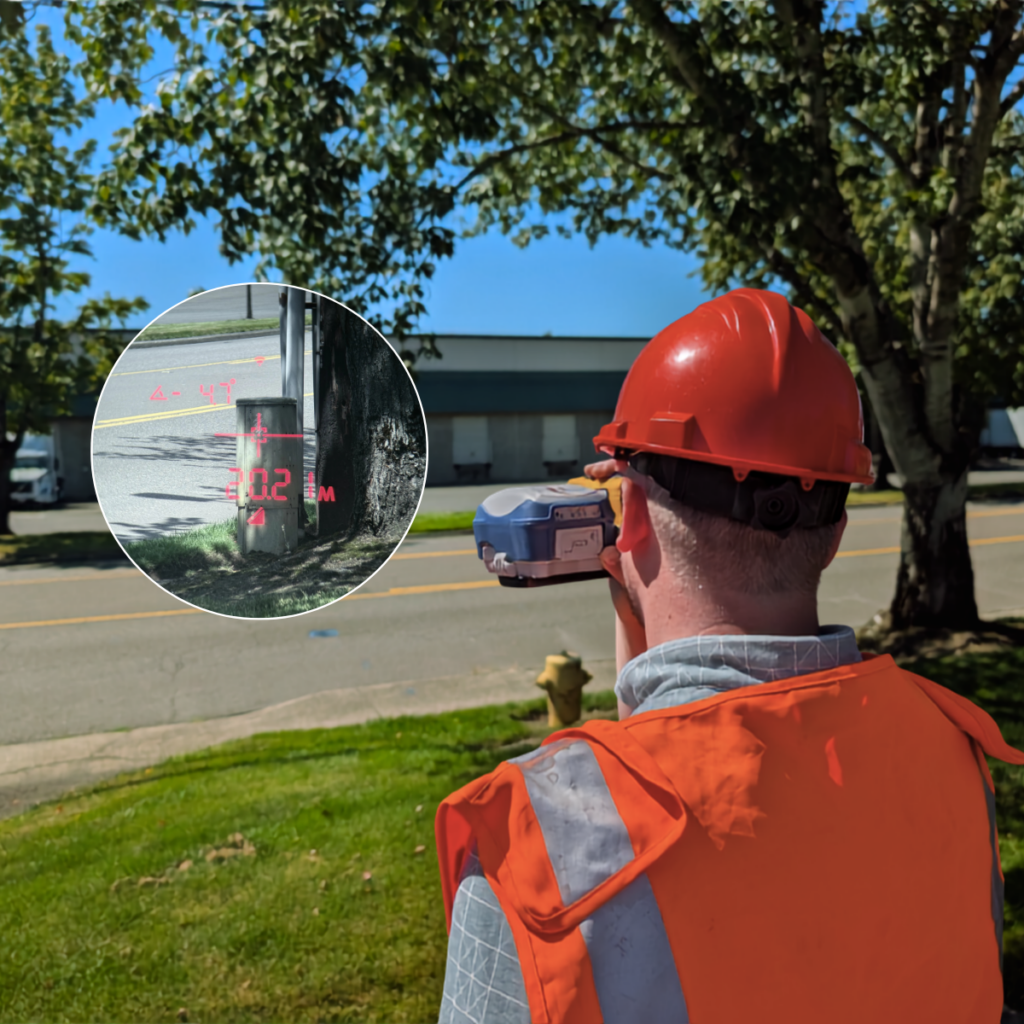
For an exposed pipe below grade or a building corner near the sidewalk, the Skadi Smart Handle provides a simple “point-and-shoot” collection method. The presenter framed it as a practical, efficient solution for accurately mapping assets up to 20 feet away.
Demo Includes:
Building corner capture in ArcGIS Field Maps and Skadi Smart Handle.
The distinction between its two modes matters. Invisible Range Pole mode computes the ground position beneath the handheld receiver. Extensible Virtual Range Pole mode uses the visible green laser dot to identify the remote point being captured, in 3D.
During the ArcGIS Field Maps demonstration, the operator stood away from a building and captured its corner. The session also discussed collecting an exposed pipe from outside a trench, provided the target is visible and within range. This method improves both safety and collection speed.
Streaming a curb line in the FastXY app
The Smart Handle demonstration also showed line collection in the FastXY app. Pointing the laser at the curb while walking alongside it allowed the operator to continuously stream positions into a line feature, rather than capture each vertex individually.
Demo Includes:
Streaming curb-line capture with the Skadi Smart Handle in the FastXY Application.
Tier 2: Longer line-of-sight measurements with Skadi LR
When a target lies beyond the Smart Handle’s practical reach, Skadi LR combines a Skadi GNSS receiver with a TruPulse laser rangefinder. A bracket holds the instruments in a defined relationship, and software combines their measurements in a simple “point-and-shoot” workflow.
In the FastXY demonstration, a rangefinder shot triggered the application to obtain the Skadi position and immediately compute and store the asset’s coordinates. The workflow used the Skadi’s IMU information rather than relying on the rangefinder’s magnetic compass.
The operator captured a building across the street and a series of street trees while standing in one position. For your crew, the same approach can reduce the need to occupy each visible asset, provided the receiver maintains a suitable RTK position.
Longer reach does not mean greater positional accuracy. Target visibility, aiming, measurement distance, and the starting GNSS position affect the result. Choose your working distance around the asset’s required tolerance, rather than the rangefinder’s maximum reach.
Profiling a building wall
Continuous mode demonstrated another way to collect asset geometry. The operator held the TruPulse fire button and swept across a building wall while FastXY streamed the measurements into a line feature.
This produced a directed profile of the surface, not a LiDAR point cloud. The demonstration illustrated an alternative to capturing each vertex separately, with the operator controlling the measurement path.
Demo Includes:
Skadi LR building capture and tree capture in FastXY, TruPulse continuous-mode wall profiling in FastXY.
Tier 3: High-accuracy GIS collection inside a building
High-accuracy GNSS doesn’t work indoors. However, by combining sensor data such as outdoor high-accuracy GNSS with laser, lidar, and angle encoder sensors upon moving indoors, the operator effectively mapped indoor assets with high accuracy. The webinar demonstrated this using a Skadi GNSS receiver, a TruPulse rangefinder, and a TruAngle II angle encoder.
The operator first captured two RTK positions outdoors to establish a reference direction. After orienting the angle encoder to that reference, they measured a marked point inside the warehouse, moved the setup onto it, and took a backsight toward the previous location.
From the indoor setup, the operator mapped electrical conduit near the rafters without relying on GNSS reception inside the building. This portion used MapSmart software on Android, with the collected data described and imported in GIS. Since the webinar, Field Maps now supports this workflow.
The workflow requires more setup than “point-and-shoot” mapping. Additional traverse steps also accumulate small measurement errors, so plan the setup and number of moves around your project’s positional tolerance.
Demo includes:
RTK, laser, TruAngle II angle encoder sensors move from high-accuracy outdoor positions to collect high-accuracy indoor conduit.
FastRTK2Go: Fast, convenient, short-baseline RTK
A nearby RTK base offers superior RTK performance in accuracy and in obstructed environments. Separate from the two “point-and-shoot” tiers and the indoor mapping tier, the webinar demonstrated the FastRTK2Go app, which uses a Skadi GNSS receiver as a temporary RTK base station.
Within three minutes of receiver power-up, the FastRTK2Go app surveys the accurate location of the Skadi receiver, places the receiver in RTK base mode, and begins broadcasting accurate RTK corrections through the FastRTK service. Nearby RTK rovers can immediately begin using the RTK corrections through NTRIP.
The short baseline improves RTK performance in tough GNSS conditions such as under/around trees. The demonstrated workflow requires internet connectivity at both the RTK base and RTK rover.
Demo Includes:
FastRTK2Go setup and correction broadcasting.
Match the collection method to your field requirements
The webinar’s practical lesson was to start with the least complex method that meets the conditions and your data requirements:
- Nearby targets: Use short-range Smart Handle “point-and-shoot” method when the asset is visible and within 20 feet.
- More distant targets: Use Skadi LR for longer, line-of-sight measurements such as trees, signs, buildings that are 50’, 100’, 150’ away depending on your accuracy requirements.
- Obstructed or indoor targets: Use a combination of RTK GNSS, laser/lidar, and angle encoder to accurately map assets indoors where high-accuracy GNSS doesn’t work.
If your crew encounters assets that are difficult to occupy or map reliably, contact Digital Mapping Group to discuss the receiver, measurement tools, software, and training appropriate for your workflow.
[The TruAngle II] is the most flexible solution as far as where it can capture data and does require a little bit setup and a little bit more complex, but as you can see, after taking two shots and and a reference angle… you’re out and ready to capture.”
Tyler Gakstatter